
Contents

How to share one set of translations between your Android and iOS app
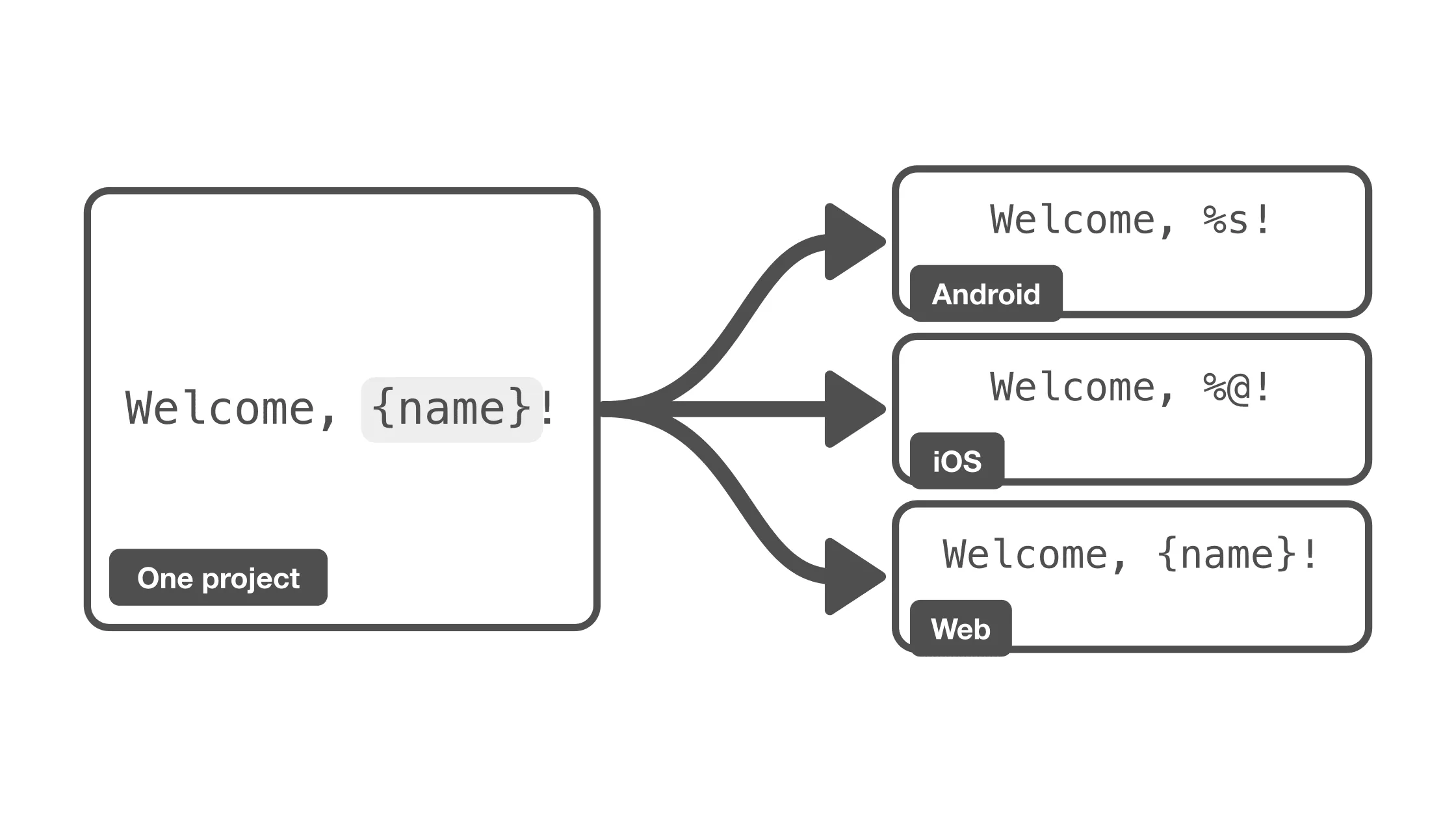
Most apps that ship on Android and iOS say the same things on both platforms. The welcome message, the error texts, the plural that counts new messages: the sentences are identical, and so are their translations. Yet most teams keep them in two translation projects, pay for the same translations twice, and fix the same typo in two places.
The reason is almost never the words. It is the placeholders. This post looks at why the two platforms' files cannot simply be thrown into one project, what a conversion between them has to get right, and how to keep one set of translations for both platforms in Localizely.
Why the same sentence ends up in two projects
Take a greeting with the user's name. On Android it lives in strings.xml:
<string name="greeting">Welcome, %s!</string>
On iOS the same string sits in Localizable.strings or a String Catalog:
"greeting" = "Welcome, %@!";
And if there is a web or Flutter app next to them, the string is an ICU message:
"greeting": "Welcome, {firstName}!"
Three files, three placeholder syntaxes, one sentence. A translation project stores text, and %s, %@ and {firstName} are different text. Upload the iOS file into the Android project and every string with a placeholder counts as changed, every translation gets overwritten with the other platform's syntax, and the next Android download is broken.
The syntaxes differ in more than the one letter:
| Platform | File formats | String | Integer | Two decimals |
|---|---|---|---|---|
| Android | strings.xml | %s, %1$s | %d | %.2f |
| iOS, macOS | .strings, .stringsdict, .xcstrings | %@, %1$@ | %d, %lld | %.2f |
| Flutter, web | .arb, JSON, XLIFF | {name} | {count} | {balance, number, ::.00} |
| .NET | .resx | {0} | {0} | {0:F2} |
So the usual answers are a project per platform, a script that rewrites the placeholders before upload and after download, or a developer who copies translations by hand. All three work until the first string that needs more than a letter swapped.
What a conversion has to get right
We built the conversion between these syntaxes into Localizely, and a few things turned out to be harder than find and replace. They are worth knowing even if you write your own script.
Arguments change order in translation
English says who joined which team, German turns it around:
<string name="team_joined">%1$s joined the team %2$s.</string>
<string name="team_joined">Dem Team %2$s ist %1$s beigetreten.</string>
A converter has to know that %1$s is the first placeholder and %2$s the second, and write the positions back in the other syntax. It also has to know when not to write them: Android Lint warns about explicit positions in strings with a single placeholder, so Welcome, %1$s! should stay Welcome, %s!.
Types travel with the placeholder
%d on Android becomes %lld in a 64-bit iOS app, %.2f has to stay a number with two decimals everywhere, and in an ICU message the same value is written as {balance, number, ::.00}. If the conversion drops the type, the iOS app formats a float with an integer specifier and shows garbage. If it drops the precision, the web app shows 12.5 where the Android app shows 12.50.
Plurals have three shapes
Android writes a plural as a resource with quantity items:
<plurals name="photo_count">
    <item quantity="one">%1$s has %2$d photo</item>
    <item quantity="other">%1$s has %2$d photos</item>
</plurals>
iOS puts the forms into a .stringsdict entry, where a substitution refers to the argument that carries the number:
<key>photo_count</key>
<dict>
    <key>NSStringLocalizedFormatKey</key>
    <string>%2$#@count@</string>
    <key>count</key>
    <dict>
        <key>NSStringFormatSpecTypeKey</key>
        <string>NSStringPluralRuleType</string>
        <key>NSStringFormatValueTypeKey</key>
        <string>d</string>
        <key>one</key>
        <string>%1$@ has %2$d photo</string>
        <key>other</key>
        <string>%1$@ has %2$d photos</string>
    </dict>
</dict>
And ICU folds everything into one message:
"photo_count": "{count, plural, one {{name} has {count} photo} other {{name} has {count} photos}}"
These describe the same thing and should land in one plural key, so that a translator translates the forms once. That means reading all three shapes into one model and writing each shape back, including the %2$#@count@ reference, which has to say that the number is the second argument.
A percent sign is not always a placeholder
Save up to 50% today has no placeholder. On Android the string is marked formatted="false" and keeps a single %. In a format string the same text needs %%. A converter that doubles every percent sign changes strings that were never formats, and one that never doubles breaks the ones that are.
The files have to come back unchanged
Whatever the conversion does inside the project, downloading a file has to give you back what you uploaded, byte for byte, as long as nobody translated anything in between. Otherwise every download produces a diff in your repository, and your team stops trusting the tool. The same holds if you ever want to go back: turning the conversion off must restore the original texts, not an approximation of them.
Tired of manually editing translation files?
Boost your productivity with the right localization tool.
One project for both platforms in Localizely
Localizely stores placeholders in one neutral form and converts them to each file format's syntax on upload and download. We call this universal placeholders. It is switched on per project, and projects that do not switch keep working exactly as before.
The stored form is the ICU simple argument, so the three greetings above become one string key with the text Welcome, {firstName}!. Next to the text, the key remembers how each platform wrote the placeholder: %s for Android, %@ for iOS. Downloads use those tokens, so each platform gets its own file back.
Here is the whole workflow for an app with English and German.
1. Switch the project to universal placeholders
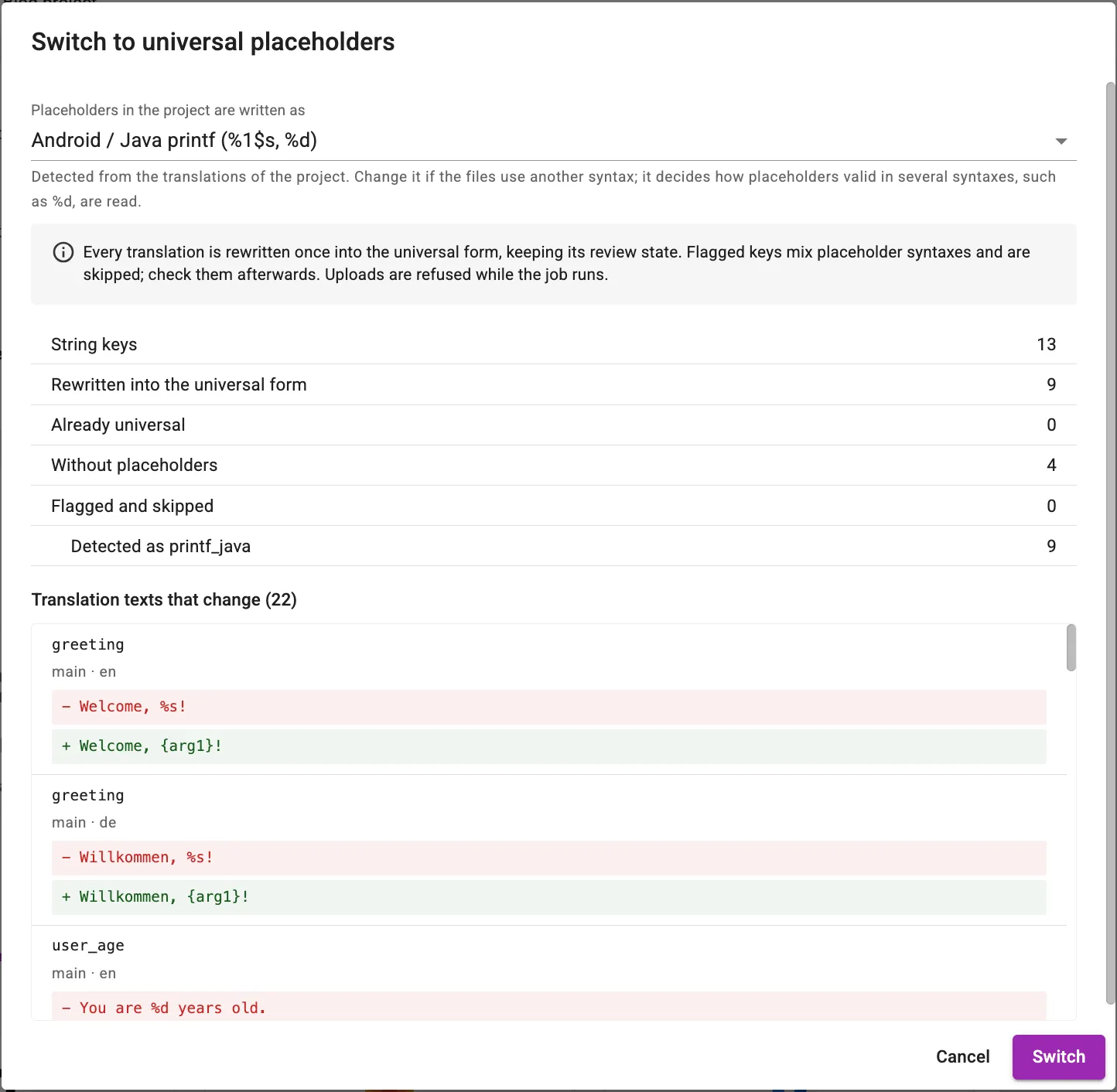
Open the project, go to Settings and then the Placeholders tab, and click Switch to universal placeholders. For a new project that is all. For a project that already has translations, the dialog detects which syntax the texts use, shows how many strings it would rewrite, and lists every change as a diff before anything happens. Strings that mix syntaxes are flagged instead of converted.
2. Upload the Android resources
Upload strings.xml for English, then for German, as you always did. Strings with placeholders are stored in the neutral form, and each string key gets a placeholder definition with the Android token. Plurals from <plurals> become plural keys.
3. Upload the iOS files
Now upload Localizable.strings and Localizable.stringsdict, or the .xcstrings catalog, into the same project. Strings that exist on both platforms match their keys, and since Welcome, %@! converts to the same Welcome, {firstName}!, nothing changes in the translation history. What the upload adds is the iOS token on each placeholder definition, and for plurals it merges the .stringsdict forms into the plural keys the Android file created.
The Placeholders tab of the translation editor shows the result: one definition per placeholder, with the token of each platform and a preview of the current translation in every syntax.
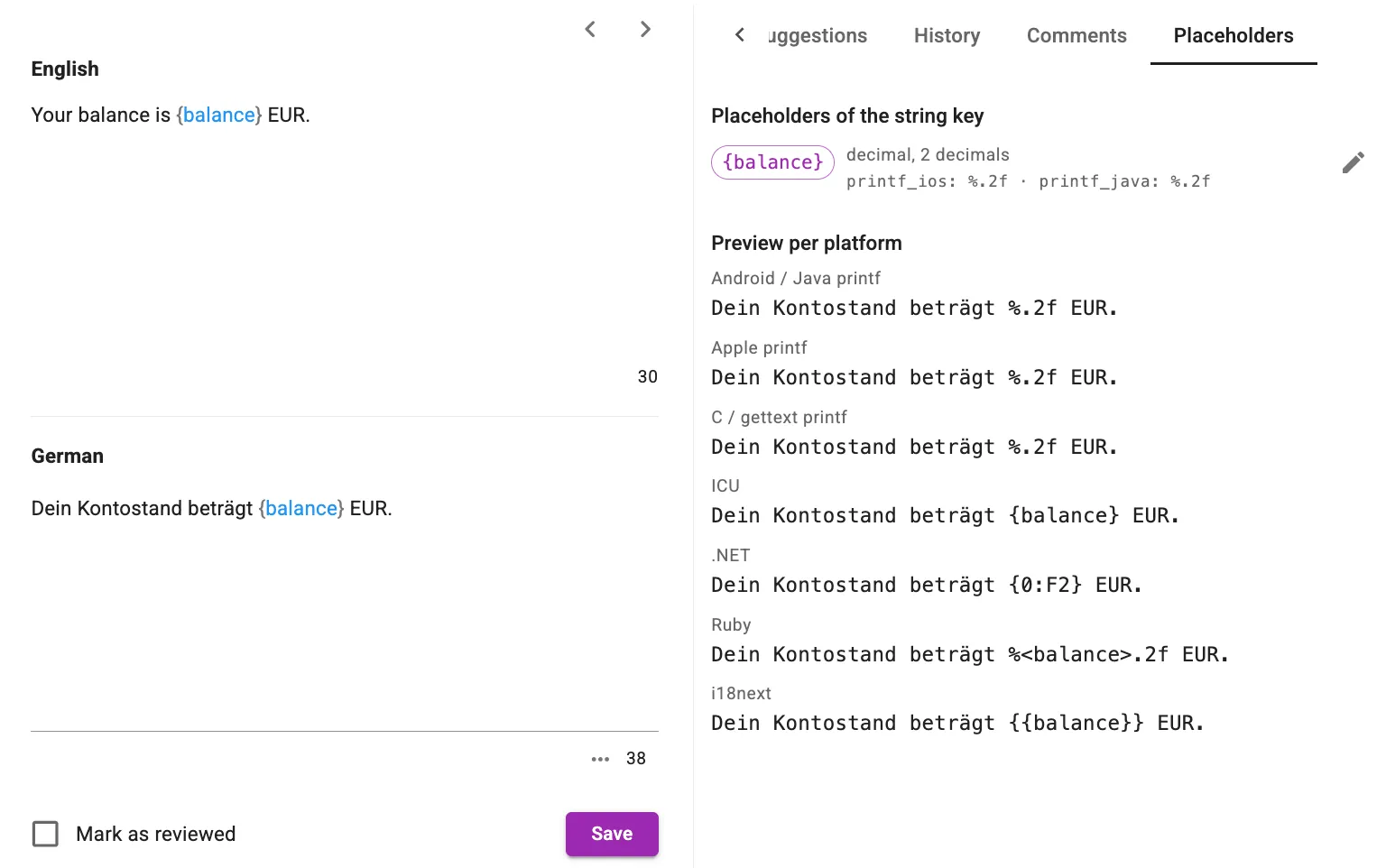
The placeholder above has already been renamed from its automatic name arg1. You can do that in this tab, or let a web file name the placeholders for you, as step 5 shows.
Uploading either file again changes nothing, which is what you want from a file that comes out of your repository on every build.
4. Download each platform's files
Download strings.xml and you get %1$s has %2$d photos with the positions Android needs. Download the .stringsdict and you get the %2$#@count@ entry with %1$@ has %2$d photos inside. Download the String Catalog and the plural variations are there. The German team_joined comes back as Dem Team %2$s ist %1$s beigetreten. on Android and Dem Team %2$@ ist %1$@ beigetreten. on iOS. Translators saw and translated it once.
5. Add the web or Flutter app
The web and Flutter apps join the same project. Flutter's ARB files are ICU already. For a JSON file, pick ICU as the placeholder syntax when uploading or downloading, or set it once for the project in the Placeholders settings. The generic formats have no syntax of their own, so you choose one: Android printf, Apple printf, ICU, .NET, Ruby or i18next.
With ICU, a plural message such as the photo_count example above lands in the same plural key as the Android and iOS plurals, and a number argument like {balance, number, ::.00} becomes a two-decimal placeholder that Android downloads as %.2f. Names from the web file are kept, so a placeholder the Android file could only call arg1 becomes firstName everywhere once the JSON file names it.
Strings that exist on one platform only
Not every string is shared. Android has tools:ignore strings, iOS has its own permission texts. Tag the keys of each platform, for example by uploading with the Tag string keys in file option, and download with a tag filter. The CLI and the configuration file support the same options, including the placeholder syntax of generic files, so the sync in your pipeline does not change.
What to expect when you switch
- Nothing changes until you switch. Universal placeholders are opt-in per project. Switching shows the diff first.
- You can switch back. Switching off restores the previous texts exactly, including strings that were only converted and never edited.
- Shared keys share text. If the two platforms wrote different sentences for the same key, the last upload wins, the same as it always did. Keep those keys apart with tags or different key names.
- Attributes of each format stay. Android
translatable="false"and the String Catalog'sshouldTranslateand extraction states live on the same key, each used by its own download.
Conclusion
Android and iOS strings end up in separate projects because of their placeholder syntax, not because the translations differ. A conversion between the syntaxes has to handle argument positions, types and precision, the three shapes of plurals, literal percent signs, and it has to be exact in both directions. With universal placeholders, Localizely does that conversion on upload and download, so one project serves your Android app, your iOS app, and whatever else you ship.
The universal placeholders documentation has the full syntax table and the details of the switch. If you want to try it with your own files, create a project, switch it on, and upload both platforms' files.
Like this article? Share it!
Aleksa is a Software Engineer at Localizely. Over the past few years, Aleksa has been working in the field of software localization. In his free time, he enjoys playing guitar and writing tech posts.
Enjoying the read?
Subscribe to the Localizely blog newsletter for quality product content in your inbox.
Related questions
- What is xliff:g in Android strings.xml and when should I use it?
- How do I change the app language programmatically on Android?
- How do I fix the Android error "is translated here but not found in default locale"?
- How do I get the current app or device language on Android?
- How do I ignore "is not translated in" (MissingTranslation) lint errors in Android?


Resources
- What is Localizely?
- Getting started
- Localization workflow
- Translation editor
- Organizations
- Flutter Over-the-Air updates
- Flutter In-Context Editing
- Project branching
- Public projects
- Professional translation services
- Machine Translation
- AI Translation
- Translation Memory
- Glossary
- Tasks
- QA checks
- Reports and statistics
- Figma integration
- AWS S3 integration
- GitHub integration
- GitLab integration
- Bitbucket integration
- CLI
- Configuration file
- Supported file formats
- Universal placeholders
- Language & Country Codes
- Referral Program
- Affiliate Program
- I18N Questions
- FAQ
Free tools
- ICU message for translators
- ICU message editor
- Hreflang generator
- Hreflang checker
- JSON Flattener
- JSON Validator
- YAML Validator
- XML Validator
- CSV Validator
- Text Compare
- Text Encoding Converter
- Localization File Converter
- JSON Word Counter
- ARB Word Counter
- Translation Cost Calculator