
Reports and Statistics
See who translated how many words, into which language, and when.
Documentation
- What is Localizely?
- Getting started
- Localization workflow
- Translation editor
- Organizations
- Flutter Over-the-Air updates
- Flutter In-Context Editing
- Project branching
- Public projects
- Professional translation services
- Machine Translation
- AI Translation
- Translation Memory
- Glossary
- Tasks
- QA checks
- Reports and Statistics
- Figma integration
- AWS S3 integration
- GitHub integration
- GitLab integration
- Bitbucket integration
- CLI
- Configuration file
- Supported file formats
- Universal placeholders
- Language & Country Codes
- Referral Program
- Affiliate Program
- FAQ
The Statistics page shows how much translation work happened in a project, broken down by language, contributor, and day. It tells you which translator translated how many words into which language, and when. Translators can see their own statistics too, so if you pay per word, both sides work from the same transparent numbers.
Viewing statistics
Open Statistics from the project menu.
By default, the page shows the number of words translated per day over the last 7 days, across all languages and all contributors.
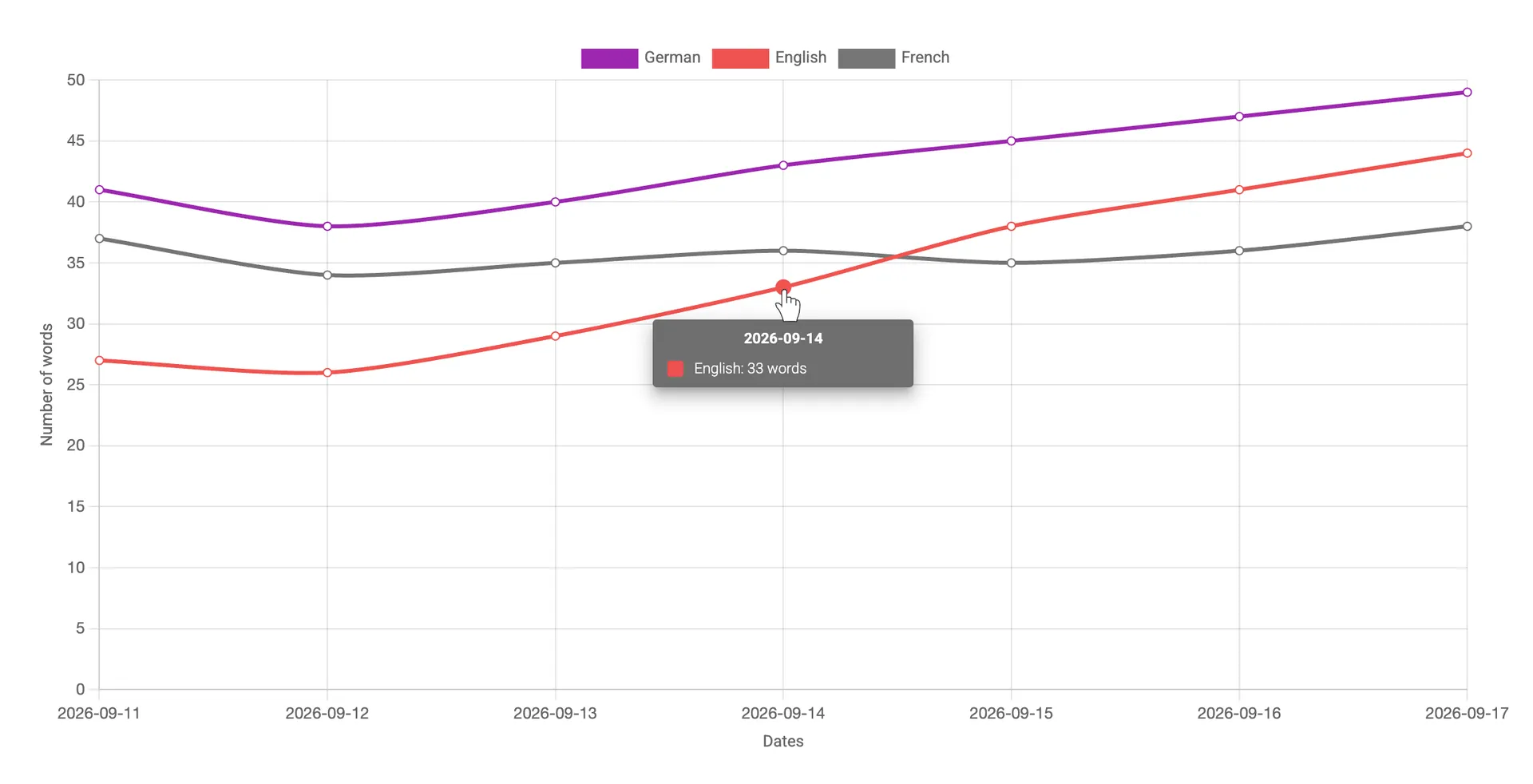
Note: Word counts are based on the main-language text of each translated key, and numbers and symbols count as words. Only new translations are counted. Editing a translation that already exists does not add to the count.
Filtering statistics
Narrow the view down with three filters:
- Language, either all languages or a single one.
- Contributor, either everyone or a single person.
- Date range, using one of the predefined ranges or a custom range of up to 60 days.
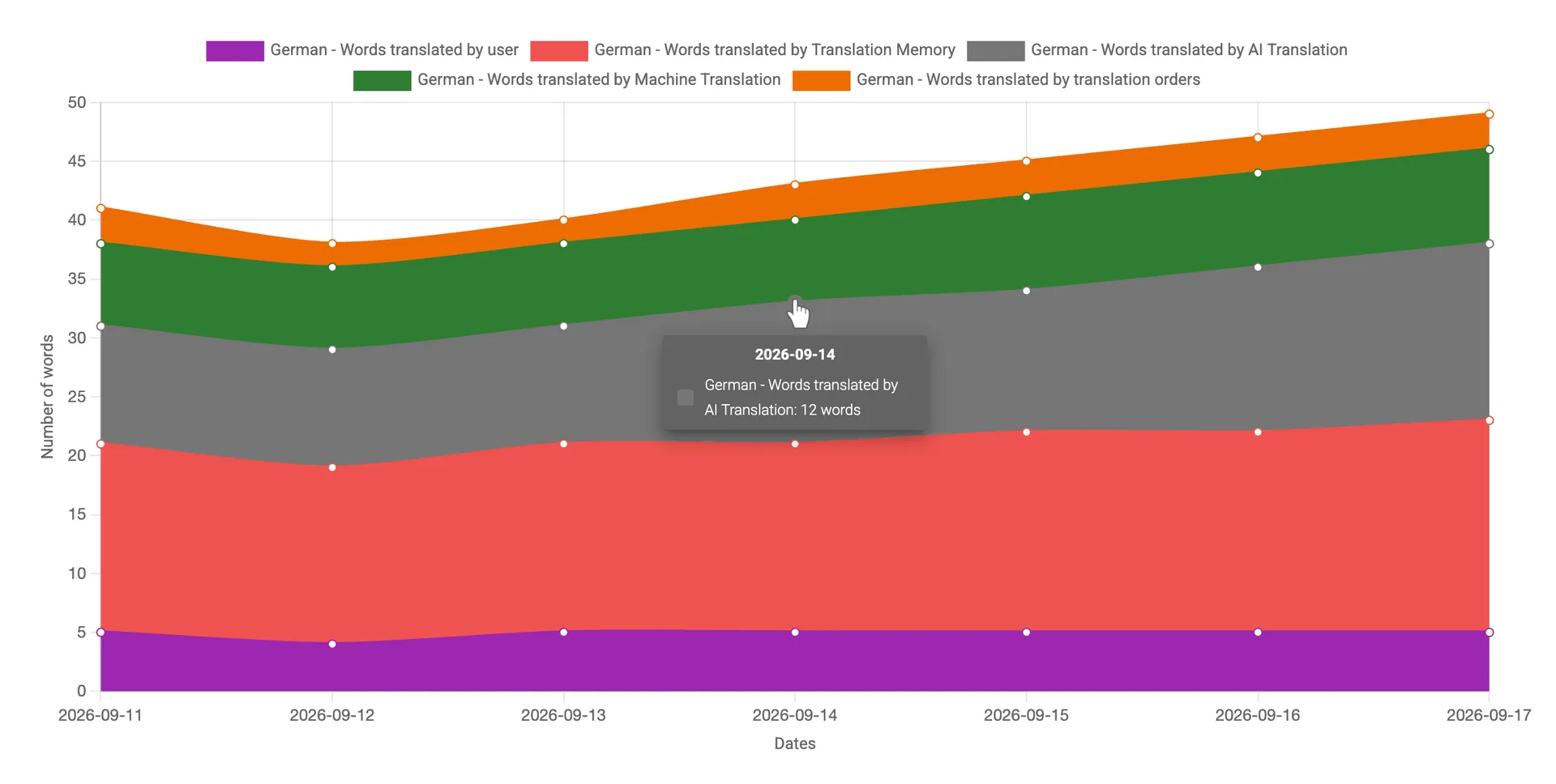
When you filter by a single language, the chart also breaks the word count down by source: words translated by a contributor, by Translation Memory, by Machine Translation and AI Translation, and through translation orders. This makes it easy to see how much of the work was done by hand and how much was automated.
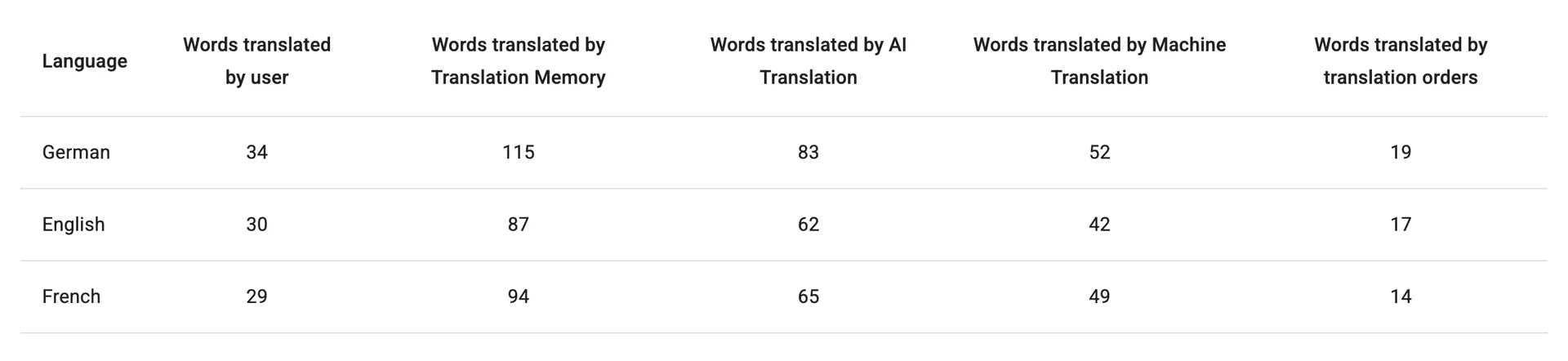
Below the chart, a summary table adds up the same figures for the selected period, one row per language.
If you have any questions about statistics or reporting, we are happy to help at support@localizely.com.
Previous: QA checks
Read next: Figma integration
Tired of manually editing translation files?
Our platform streamlines software localization for you.
Documentation
- What is Localizely?
- Getting started
- Localization workflow
- Translation editor
- Organizations
- Flutter Over-the-Air updates
- Flutter In-Context Editing
- Project branching
- Public projects
- Professional translation services
- Machine Translation
- AI Translation
- Translation Memory
- Glossary
- Tasks
- QA checks
- Reports and Statistics
- Figma integration
- AWS S3 integration
- GitHub integration
- GitLab integration
- Bitbucket integration
- CLI
- Configuration file
- Supported file formats
- Universal placeholders
- Language & Country Codes
- Referral Program
- Affiliate Program
- FAQ

Resources
- What is Localizely?
- Getting started
- Localization workflow
- Translation editor
- Organizations
- Flutter Over-the-Air updates
- Flutter In-Context Editing
- Project branching
- Public projects
- Professional translation services
- Machine Translation
- AI Translation
- AI Assistant
- Translation Memory
- Glossary
- Tasks
- QA checks
- Reports and statistics
- Figma integration
- AWS S3 integration
- GitHub integration
- GitLab integration
- Bitbucket integration
- CLI
- Configuration file
- Supported file formats
- Universal placeholders
- Language & Country Codes
- Referral Program
- Affiliate Program
- I18N Questions
- FAQ
Free tools
- ICU message for translators
- ICU message editor
- Hreflang generator
- Hreflang checker
- JSON Flattener
- JSON Validator
- YAML Validator
- XML Validator
- CSV Validator
- TMX Viewer
- Text Compare
- Text Encoding Converter
- Localization File Converter
- JSON Word Counter
- ARB Word Counter
- Translation Cost Calculator