
Shorten a translation to fit
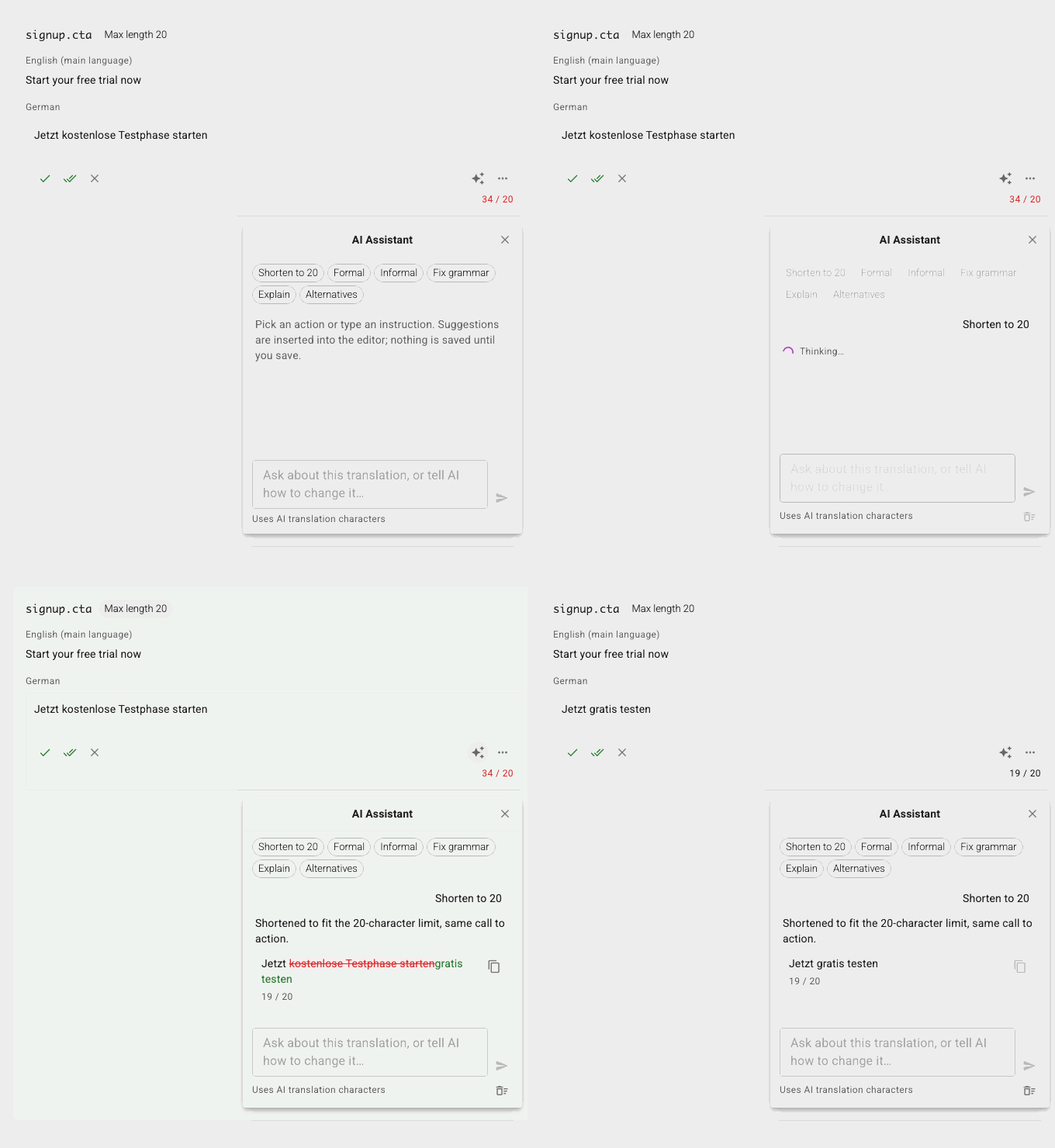
German runs about a third longer than English, and a button does not grow. Pick Shorten and the assistant rewrites the translation to fit the string key's maximum length, keeping the meaning and every placeholder. When a limit cannot be met, it says so instead of guessing.
Change the tone
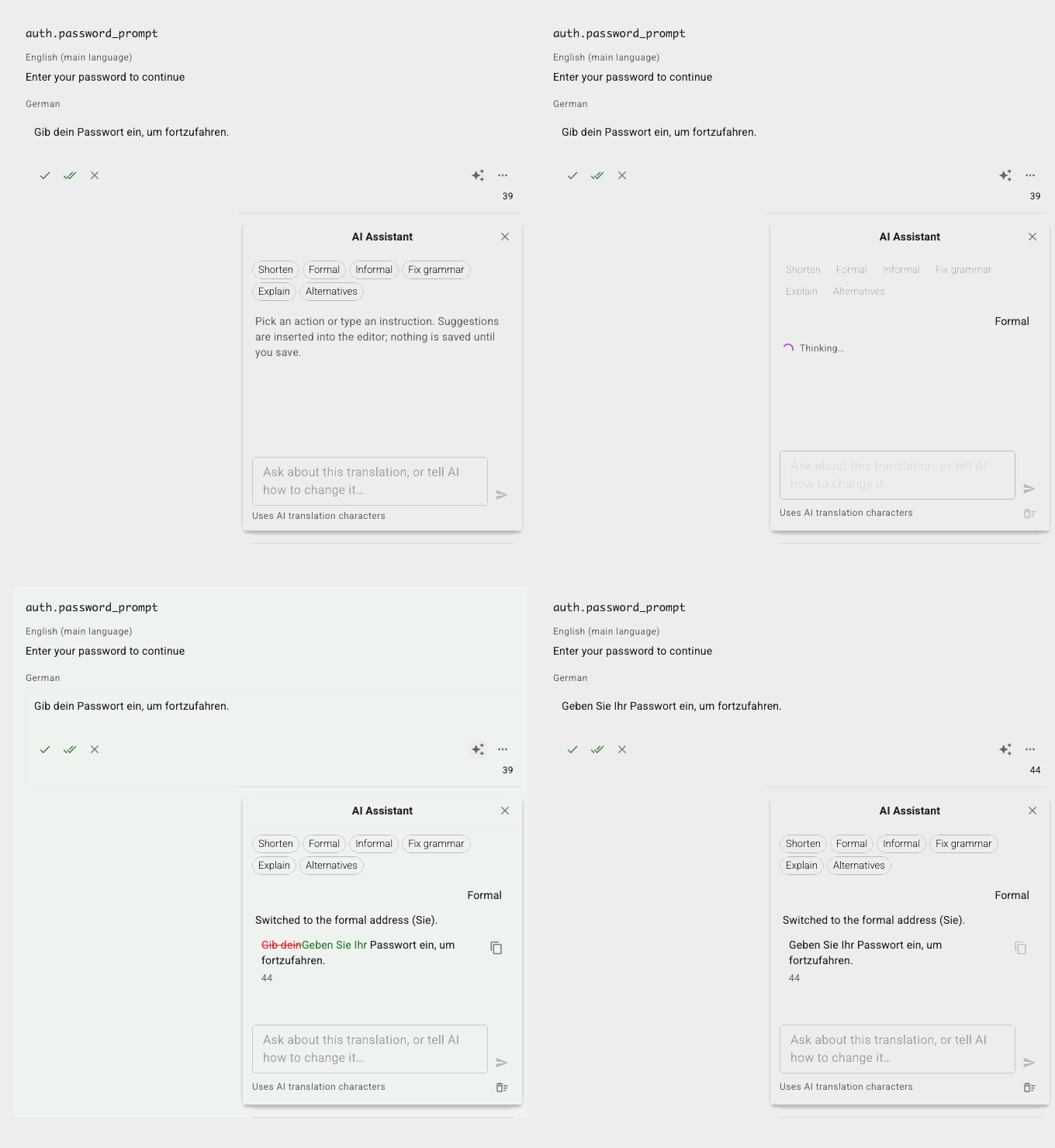
Formal or informal, in one click. The assistant knows how formality works in the target language, from Sie and du in German to polite forms in Japanese, so you do not have to explain it. Ask for Alternatives and pick the wording you like from three variants.
Fix grammar and spelling
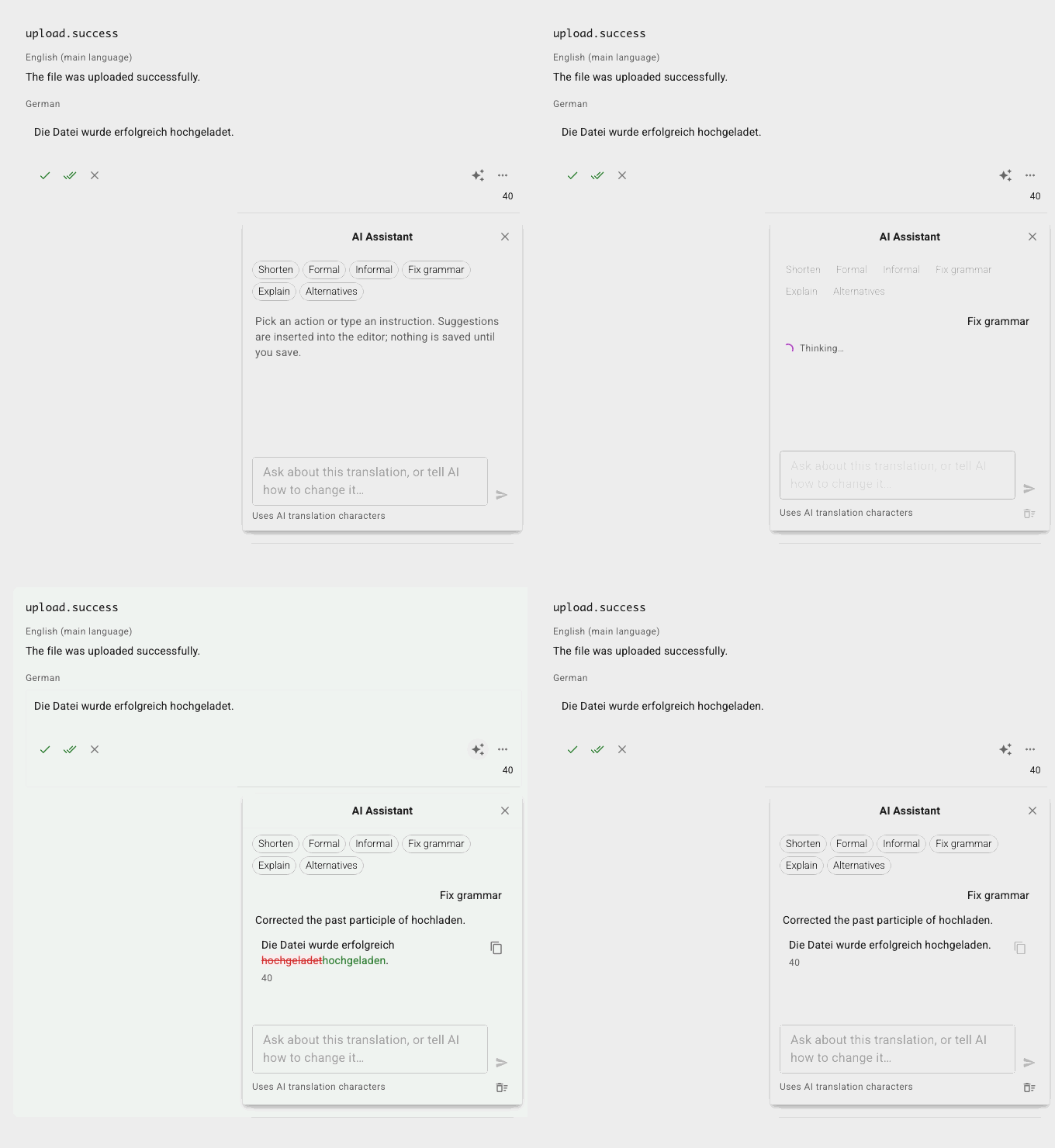
A typo in a translation is a typo in your product. Fix grammar corrects spelling, grammar and punctuation without touching the meaning or the style, and tells you when there is nothing to fix.
Explain a translation you cannot read
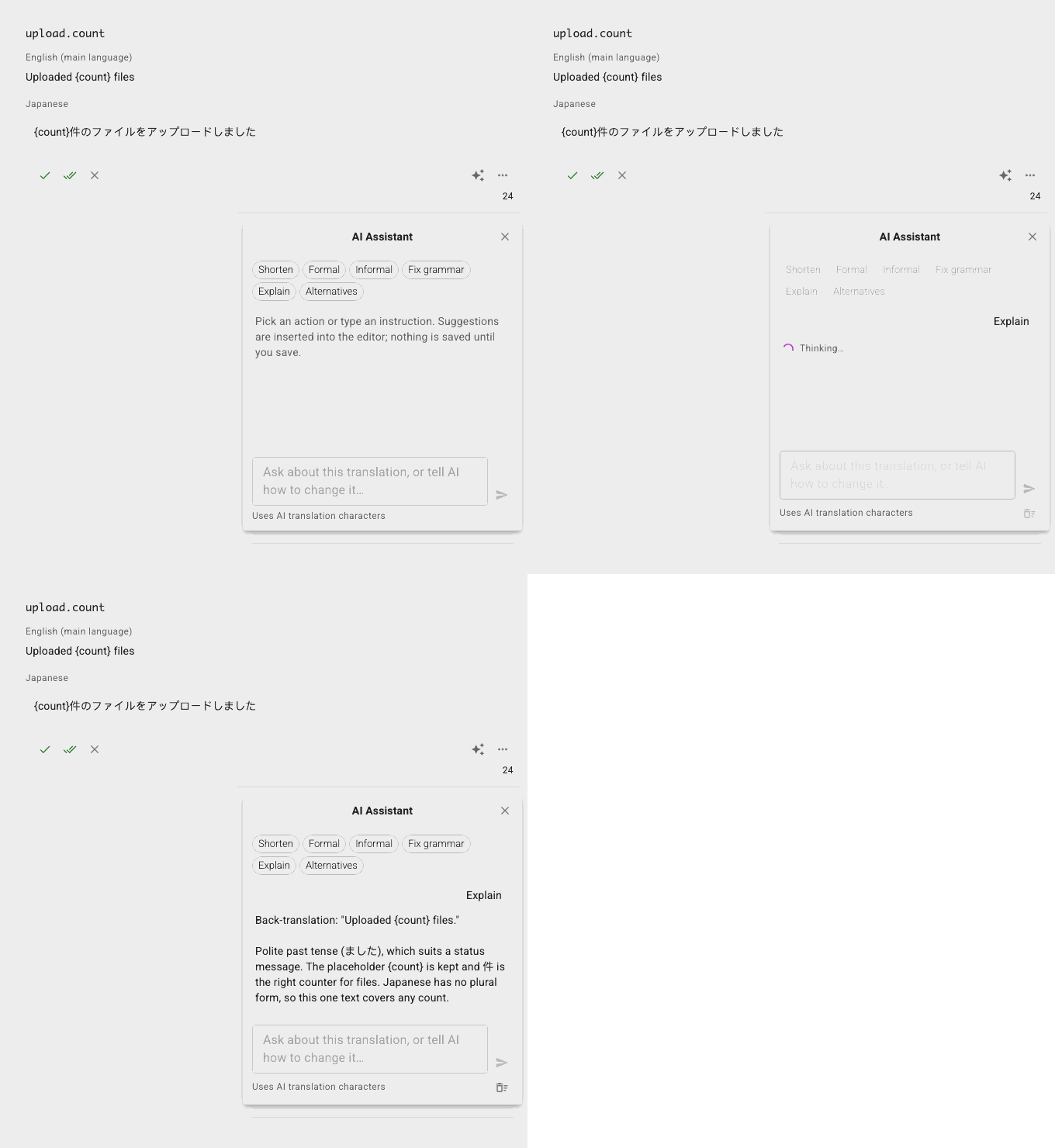
Reviewing a language you do not speak? Explain gives you a literal back-translation into the source language and points out anything unusual: a shift in meaning, a missing placeholder, a tone that does not match the original.
Ask anything about the string
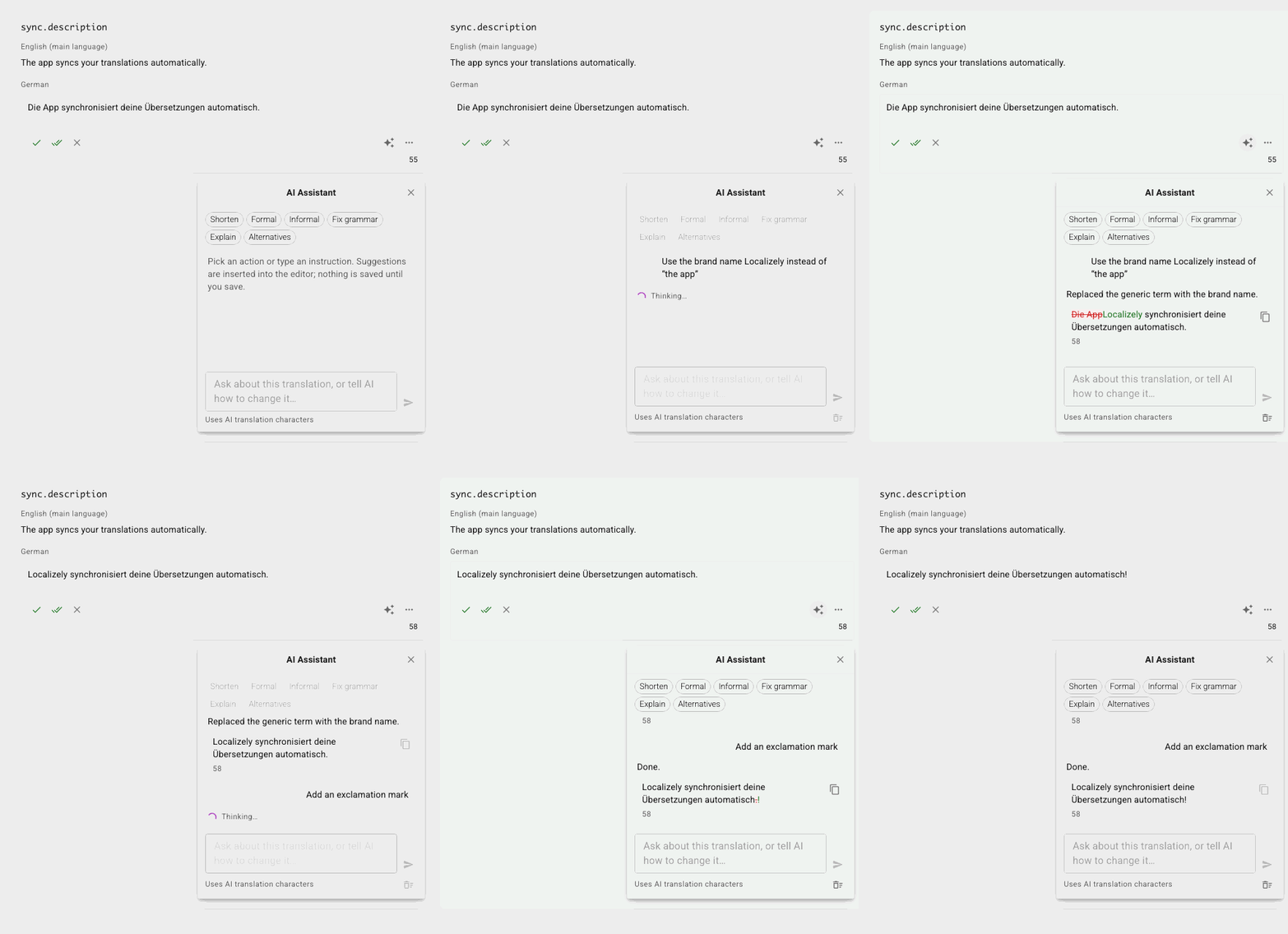
Type your own instruction: “use the brand name instead of the generic term”, “keep the exclamation but make it shorter”, “is this idiom natural in Brazilian Portuguese?”. The conversation stays with the string, so you can refine step by step. When a language is still empty, the assistant drafts the translation for you.
Built for review, not autopilot
Suggestions, not changes. Every rewrite lands in the editor as a proposal. Nothing is saved until you save, and a saved suggestion is marked “via AI” in the history.
QA-checked before you insert. Each suggestion shows the difference to the current text, its length against the key's limit, and any QA check it would fail, such as a missing placeholder or tag.
The same context as AI Translation. The key description, screenshots, glossary terms and your project's style guide go into every answer.
Under your control. Translators use it only when the project allows them AI translation, and strings marked “do not translate” are left alone.
What the assistant sees
For each request the assistant receives the string's source text, the translation you are working on, the key description and notes, attached screenshots, matching glossary terms, the project description and the previous turns of your conversation about that string. Nothing else from your project.
Localizely keeps no record of the conversation: it lives in your browser while you work and is gone when you reload. The AI provider that processes the requests is listed in our privacy policy and does not use your data to train its models.
Pricing
The AI Assistant uses the same characters as AI Translation: the text it reads and your instruction count at twice the machine translation rate, and each screenshot adds 30 characters. Every organization starts with 2 000 free characters, and more can be bought any time on the Billing page. There is no extra plan or add-on.
Frequently Asked Questions (FAQ)
How is the AI Assistant different from AI Translation?
AI Translation fills in empty translations, one string or a whole batch at a time. The assistant works with you on one translation: it rewrites, shortens, fixes or explains what is already there, and drafts a translation only when you ask it to.
Where do I find it?
In the bilingual editor it is the AI Assistant tab, next to Suggestions and History. In the Translations table, edit a translation and click the sparkle button in its toolbar.
Does it change my translations by itself?
No. It only suggests. You insert a suggestion into the editor, edit it if you like, and save it yourself.
Which languages does it support?
Every language of your project. The assistant answers in the language you write to it in, and the presets answer in English.
Can translators use it?
Yes, when a project admin allows Machine Translation and AI Translation for translators in the project settings. Until then they see the button disabled, with a note on whom to ask.
Does it work with plural strings?
Yes. It works on the plural form you are editing and keeps the ICU syntax of the source text in mind.
Where is the conversation stored?
In your browser only, for the strings you asked about most recently. A reload or a project switch starts fresh, and nothing is kept on Localizely's servers.
Looking for the step-by-step? Read the AI Assistant section of the docs.
Tired of manually editing translation files?
Our platform streamlines software localization for you.

Resources
- What is Localizely?
- Getting started
- Localization workflow
- Translation editor
- Organizations
- Flutter Over-the-Air updates
- Flutter In-Context Editing
- Project branching
- Public projects
- Professional translation services
- Machine Translation
- AI Translation
- AI Assistant
- Translation Memory
- Glossary
- Tasks
- QA checks
- Reports and statistics
- Figma integration
- AWS S3 integration
- GitHub integration
- GitLab integration
- Bitbucket integration
- CLI
- Configuration file
- Supported file formats
- Universal placeholders
- Language & Country Codes
- Referral Program
- Affiliate Program
- I18N Questions
- FAQ
Free tools
- ICU message for translators
- ICU message editor
- Hreflang generator
- Hreflang checker
- JSON Flattener
- JSON Validator
- YAML Validator
- XML Validator
- CSV Validator
- Text Compare
- Text Encoding Converter
- Localization File Converter
- JSON Word Counter
- ARB Word Counter
- Translation Cost Calculator