
Organizations
One shared home for your team's projects, members, billing, and translation assets.
Documentation
- What is Localizely?
- Getting started
- Localization workflow
- Translation editor
- Organizations
- Flutter Over-the-Air updates
- Flutter In-Context Editing
- Project branching
- Public projects
- Professional translation services
- Machine Translation
- AI Translation
- Translation Memory
- Glossary
- Tasks
- QA checks
- Reports and Statistics
- Figma integration
- AWS S3 integration
- GitHub integration
- GitLab integration
- Bitbucket integration
- CLI
- Configuration file
- Supported file formats
- Universal placeholders
- Language & Country Codes
- Referral Program
- Affiliate Program
- FAQ
An organization is the shared workspace for your team in Localizely. It brings together the things your team shares, from projects and members to translation memories, glossaries, and billing, so your localization work is organized and managed in one place.
When you sign up, Localizely creates a default organization for you and makes you its owner. Your free trial, sample project, and free MT characters live there, so you can try everything Localizely offers from day one.
What organizations give you
Projects, members, billing, and translation assets are managed at the organization level. In practice, this means:
- Shared translation assets. Translation memories and glossaries are available to every project in the organization.
- One plan for all projects. The subscription, usage, and add-ons cover every project in the organization.
- Team access in one place. Members you add to the organization get access to all of its projects and resources.
- Resilient to team changes. Because projects, billing, and translation assets belong to the organization, members can come and go without disrupting your work.
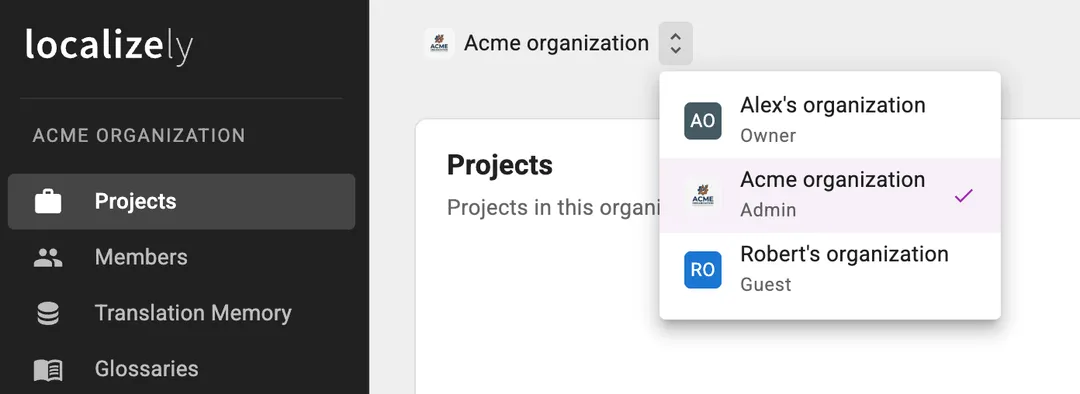
- One account, many organizations. Join as many organizations as you need and switch between them from the same account.
What belongs to an organization
Every organization includes the following:
- Projects: a list of all projects within the organization. This is where you create new projects and open existing ones.
- Members: the people with full access to the organization and all of its projects. See Members and access below.
- Translation Memory: the translation memories available to projects in the organization.
- Glossaries: the glossaries available to projects in the organization.
- Translation Orders: the translation orders placed for projects in the organization. This is where you see existing orders and create new ones.
- Billing: the plan, usage, add-ons, and MT characters used by machine translation and AI translation. This is also where you manage billing details, view billing history, and configure invoice recipients.
- Settings: general settings for the organization, such as its name and photo.
Note: Project contributors who are not organization members have the Guest role on the organization. Guests get read-only access to the Projects and Glossaries pages, limited to the projects they contribute to and the glossaries tied to those projects.
Working in multiple organizations
One account can belong to any number of organizations, such as your own, your employer’s, or a client’s. Each organization is fully separate from the others, with its own projects, members, billing, and translation assets.
To move between them, use the organization switcher in the app, which also shows your role in each organization. Everything you see, from the project list to the billing page, belongs to the organization you currently have selected.
Members and access
Access to an organization is defined by one of the following roles:
- Owner: full access to everything in the organization. Every organization has exactly one owner.
- Admin: full access to everything in the organization: projects, translation memories, glossaries, billing, and settings. Members you add on the Members page get this role.
- Guest: anyone invited to a project as a project admin or translator without being an organization member. Guests have read-only access to the Projects and Glossaries pages, limited to the projects they were invited to.
Organization admins have full access, so if someone only needs to work on a specific project, invite them as a contributor on that project’s Contributors page instead, either as a project admin or a translator.
Frequently Asked Questions (FAQ)
Do I need to set up an organization before I can use Localizely?
No. Your account comes with one already, and you can start creating projects in it right away.
Can a translation memory or glossary be shared with a project in another organization?
No. Translation memories and glossaries belong to one organization and are available only to projects in that organization. If you need the same content in both, export a translation memory as a TMX file or a glossary as a CSV file and import it into the other organization.
Which organization is billed for a project?
The one that owns it. A project always counts toward the plan and usage of the organization that owns that project.
I was invited to another organization. Does that affect my own?
No. Your own organization, its projects, and its billing are unchanged. You simply gain access to the other organization as well and can switch between the two.
Previous: Translation editor
Read next: Flutter Over-the-air translation updates
Tired of manually editing translation files?
Our platform streamlines software localization for you.
Documentation
- What is Localizely?
- Getting started
- Localization workflow
- Translation editor
- Organizations
- Flutter Over-the-Air updates
- Flutter In-Context Editing
- Project branching
- Public projects
- Professional translation services
- Machine Translation
- AI Translation
- Translation Memory
- Glossary
- Tasks
- QA checks
- Reports and Statistics
- Figma integration
- AWS S3 integration
- GitHub integration
- GitLab integration
- Bitbucket integration
- CLI
- Configuration file
- Supported file formats
- Universal placeholders
- Language & Country Codes
- Referral Program
- Affiliate Program
- FAQ

Resources
- What is Localizely?
- Getting started
- Localization workflow
- Translation editor
- Organizations
- Flutter Over-the-Air updates
- Flutter In-Context Editing
- Project branching
- Public projects
- Professional translation services
- Machine Translation
- AI Translation
- AI Assistant
- Translation Memory
- Glossary
- Tasks
- QA checks
- Reports and statistics
- Figma integration
- AWS S3 integration
- GitHub integration
- GitLab integration
- Bitbucket integration
- CLI
- Configuration file
- Supported file formats
- Universal placeholders
- Language & Country Codes
- Referral Program
- Affiliate Program
- I18N Questions
- FAQ
Free tools
- ICU message for translators
- ICU message editor
- Hreflang generator
- Hreflang checker
- JSON Flattener
- JSON Validator
- YAML Validator
- XML Validator
- CSV Validator
- Text Compare
- Text Encoding Converter
- Localization File Converter
- JSON Word Counter
- ARB Word Counter
- Translation Cost Calculator